Recorders · ScreenFlow
ScreenFlow voiceover recording: the quiet-take session, Mac edition
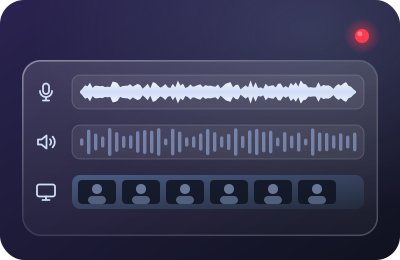
ScreenFlow has been the Mac screencaster's workhorse for the better part of two decades, and its audio design has aged gracefully: narration lands on its own track, untouched, exactly as your input delivered it. That's a gift — if you deliver it something worth keeping.
Status check, 20 September 2026: ScreenFlow is alive and actively sold by Telestream — version 10.5.1 shipped 18 November 2025 per Telestream's own version history. We link Telestream directly; no affiliate relationship.
First, the rumor check
Every year or two the forums declare ScreenFlow dead. As of our verification date, it isn't: Telestream's version history lists 10.5.1 as a November 2025 release and the product remains on active sale with current promotions. We note this because course creators plan in years, and committing a course library to a tool is a bet on its pulse. Today the pulse is there. We'll re-verify when we revise this page — the date at the top is your freshness contract.
Where ScreenFlow sits on the live-vs-cleanup line
Same side as Camtasia: capture is raw. There is no live suppression stage in ScreenFlow's recorder; its noise-reduction and EQ live in the editor as post-recording filters on the clip. What ScreenFlow does exceptionally well is separation — microphone, system audio and camera each arrive on their own timeline track, so narration stays surgically replaceable forever. Our philosophy, then, is unchanged: make the narration track so clean on arrival that ScreenFlow's audio filters stay unused. (Editor cleanup how-tos are out of this desk's lane, deliberately.)
- Microphoneyour narration, untouched
- System audioits own track
- Cameraits own track
Keep the narration track clean on arrival and it stays replaceable, sentence by sentence.
The session, from the New Recording dialog down
- Confirm the mic in the recording dialog every session. ScreenFlow's audio dropdown remembers yesterday's choice, not your intent. Docked MacBooks with an external display are one wireless-earbud autoconnect away from narrating a whole lesson through the wrong mic at conference-call quality.
- Set the input level in macOS Sound settings. Speak at true narration volume and put the meter's peaks around two-thirds, then confirm against ScreenFlow's own level indicator before rolling. The field guide's rule holds: strong over the room, never kissing the top.
- Sweep the input path for other apps' fingerprints. Meeting and chat apps on macOS enjoy latching processing onto input devices. Quit them for the session. If your narration suddenly sounds thin or pumpy in a test, something upstream is "helping."
- Add live suppression as a virtual input if your room needs it. A layer like Krisp appears to macOS as a microphone; pick it in ScreenFlow's dialog and the pristine-forever narration track is pristine and quiet. In a genuinely silent room, skip it — fewer stages is always better.
- Roll a sixty-second rehearsal take. Screen plus voice, played back in headphones, checking device, level, room, and the click of your own keyboard (ScreenFlow sessions are mouse-heavy; keys still find their way in).
- Slate takes, punch in, and close with room tone. Two seconds of "chapter two, take one" at each head; re-speak flubbed sentences after a beat instead of restarting (the one-pass method); thirty silent seconds through the same chain before you stop (room tone, explained). The separate narration track makes all three habits pay double here.
System audio and your voice are different problems
ScreenFlow can capture computer audio on its own track via Telestream's audio driver. Keep it there and keep it out of your mic plan — suppression layers and input gain are for the voice path only. If demo-app sounds are fighting your narration, that's a mixing decision for the edit, not a recording-side noise problem.
The desk's ScreenFlow chain
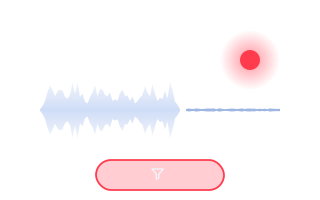
Krisp selected in the New Recording dialog, macOS input level set at narration volume, slate at the head, tone at the tail. The narration track arrives clean enough to ship.
Marked on the slate as paid: start a Krisp plan from this button and Krisp pays the desk a commission for the referral. You pay krisp.ai’s own list price, not a cent more. Krisp pricing verified 20 September 2026: 7-day trial; Core $8/mo annual, $16 monthly; 60-min/day free tier survives in help-center docs. ScreenFlow: linked direct at telestream.net — no affiliate relationship.
Honest limits
- Mac-only, forever. Cross-platform teams standardize elsewhere; that's a workflow fact, not a criticism.
- Raw capture cuts both ways. The recorder will faithfully preserve your hot gain, your boomy kitchen, and your neighbor's leaf blower. Nothing on the timeline un-happens any of it — reverb and clipping in particular are permanent residents.
- Suppression trade-offs apply. Any live layer can shave sibilance at aggressive settings; A/B one test take in your own room before committing a course to it.
- Rescue is a different craft. Genuinely wrecked but irreplaceable audio is a cleanup-after job in editing tools, with specialists of its own. When to accept that — and when re-recording is honestly cheaper.
The desk's ScreenFlow verdict
ScreenFlow treats your narration like archival material: separate, untouched, endlessly revisable. Match that respect on the way in — deliberate device, honest levels, suppression when the room demands it, tone at the tail — and a ScreenFlow course library becomes the easiest kind to maintain: open the project, punch in the new sentence, export. The recorder never needed to forgive you, because there was nothing to forgive.
Keep going: the audio bar course platforms actually set, and the ninety-second ritual before every REC.