Workflow · the spine of this site
Live noise removal vs. cleanup after: decide where noise dies, once
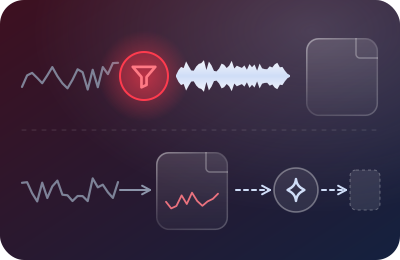
Every screencast workflow answers one question, whether its owner ever asked it: does background noise get stopped before it reaches the file, or scrubbed out of the file afterwards? Both answers ship courses. But they build opposite workflows, and picking deliberately — once — is worth an hour of anyone's time. This page is that hour, compressed.
Recorder behaviors cited below were verified against vendor documentation on 20 September 2026 — details and links on each recorder's own page.
Terms, precisely
Live noise removal processes your microphone stream while you speak: an OBS Noise Suppression filter, or a system layer like Krisp sitting under any recorder. The master file never contains the noise. Cleanup after operates on a finished recording inside an editing tool — analyzing captured audio and subtracting the noise it finds. The master contains the noise forever; cleaned copies are derived from it. And there's a genuine third category with exactly one famous resident: Loom's Noise filter, which processes playback — the stream viewers hear is cleaned, while the file underneath (and, per Loom's docs, anything you download) stays original.
Live noise removalThe master never contains the noise.
- Your mic
- Live filter
- Master fileclean
Cleanup afterThe master keeps the noise; cleaned copies derive from it.
- Your mic
- Master filenoisy
- Editor cleanup
- Cleaned copy
Playback filter (Loom)Viewers hear it cleaned; downloads stay original.
- Your mic
- Fileoriginal
- Web playerfiltered
- Downloadoriginal
The economics, which is where this is actually decided
Sound quality debates about live-versus-cleanup mostly miss the point — modern tools on both sides are good. The decisive difference is when the cost is paid and how often:
| Live removal | Cleanup after | |
|---|---|---|
| Cost shape | Fixed: one setup, ~10 minutes, then free per take | Per-lesson: every recording pays the processing toll, forever |
| Scales with | Nothing — lesson 1 and lesson 90 cost the same | Course size — 90 lessons is 90 cleanup passes |
| Revisions | Free — the master is already clean; re-cut and go | Taxed — every re-edit works from the noisy master or a re-processed copy, and the cleanup must be reproduced consistently (same tool, same settings, next year) |
| Failure mode | Discovered in your test take, before anything real is recorded | Discovered after the fact — artifacts, warbled words, that underwater shimmer — when re-recording may no longer be possible |
| What it can't touch | Reverb, clipping, other people's audio — same as the other column | Same list, plus it inherits whatever the capture already destroyed |
Live removalone setup, about ten minutes, then nothing per take
Cleanup afterone cleanup pass per lesson: 90 passes
Chart: by lesson 90, live removal has cost one setup; cleanup after has cost 90 separate passes.
From the economics table above: live removal is a fixed cost; cleanup is paid again for every lesson.
For a course creator — someone whose recordings are revised, re-exported and re-used across years — the left column isn't merely better; it compounds. This is the desk's core position, and every recorder page on this site is that position applied: stop noise at the recorder, keep masters clean, let the editor edit rather than repair.
The honest case for cleanup-after
A position isn't honest until it states its exceptions plainly. Cleanup is the right answer when:
- The recording already exists and can't be re-made. The guest interview, the one-time live demo, the conference talk. Rescue work on irreplaceable audio is exactly what cleanup tools are for — pay the toll gladly.
- The noise was a one-off event, not a condition. A single siren through an otherwise clean 40-minute take doesn't justify re-recording — though check first whether a punch-in you already recorded covers the sentence for free.
- You're salvaging an archive. Back-catalog lessons recorded before you had a chain. Clean them once, and record everything new the recording-side way so the archive stops growing.
- Your noise defeats live tools. Rare, but real: erratic, voice-adjacent noise that makes live suppressors chew your consonants in your A/B test. Better an untouched capture plus deliberate repair than a damaged capture you can't undo.
And a boundary, stated plainly
When you're in one of those cases, you're in a different craft: editor-side noise repair has its own tools, tutorials and specialists, and this desk doesn't pretend to be one of them. We'll tell you when you're in rescue territory; we won't walk you through any editor's noise module. Recording side only — that's the deal on the masthead.
The hybrid trap: assuming you have live removal when you don't
The costliest mistake in this decision isn't picking the "wrong" column — it's believing you picked the left one while living in the right one. The pattern, recorder by recorder, as verified on our date: Camtasia and ScreenFlow capture raw — their noise tools are editor-side, so without a layer underneath you are a cleanup-after workflow by default, whether you meant to be or not. Loom cleans playback only — download the file and you're holding the raw column. Only OBS ships the left column natively. Ten minutes with your recorder's own page here — Camtasia, ScreenFlow, Loom, OBS — settles which workflow you actually own today.
The decision, as a two-minute flow
- Is the audio already recorded and irreplaceable? → Cleanup, once, in a proper editing tool. Then come back and build the chain so this stops happening.
- Does your room have steady noise (fan, HVAC, street)? → Live removal, always: OBS's filter if you record there (free), a system layer under everything else. Steady noise is live suppression's home game.
- Quiet room, controlled hours? → Neither. Honest levels and room tone outrank both columns when there's little noise to remove — don't add processing you don't need.
- Erratic, unpredictable noise? → Live removal on trial: A/B your actual worst hour. If consonants survive, done. If not, schedule recording around the noise before surrendering to per-lesson cleanup — the calendar is also a noise tool.
Decide once, then stop deciding
The point of this page isn't that cleanup is bad — it's that defaulting into it accidentally is expensive, and the exit costs ten minutes: pick where noise dies in your workflow, set the chain, run one test take, write your settings down. From then on it's not a decision anymore; it's plumbing. Which frees you for the part of narration software can't do — the take itself — with the ninety-second checklist holding the whole ritual together.