Recorders · the layer underneath
Krisp for course creators: one clean chain under every recorder you'll ever use
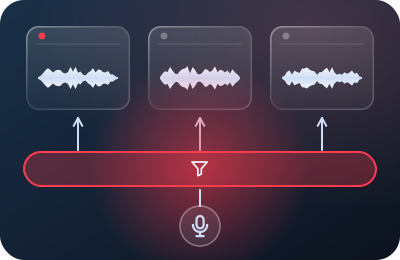
Krisp isn't a recorder — it's the stage most recorders are missing. It installs as a desktop app on Mac or Windows and presents itself to the system as a microphone; every app that selects it receives your voice with the background noise already stripped, live. This page is the course creator's case for it, argued honestly: where it's the right tool, where it's redundant, and exactly what it costs today.
Pricing and plan facts verified on krisp.ai and Krisp's help center on 20 September 2026. Details change; check before you buy.
The problem Krisp actually solves for course work
Course creators are the multi-recorder population. The same person records module lessons in Camtasia or ScreenFlow, quick supplementary walkthroughs in Loom, and the occasional long demo in OBS. Configure noise handling per-app and you get four different sonic fingerprints across one course — and one of those apps (Loom) can't clean its own downloads at all. A system-level layer flips the architecture: clean once, under everything. Every file from every recorder inherits the same processed voice, this month and in the revision you record next spring. Consistency is the underrated deliverable here; learners register a course that "sounds professional" without knowing that what they're noticing is sameness.
- Loom
- Camtasia
- ScreenFlow
Set once per recorder; the next recorder you adopt inherits it the same way.
Where it fits — and where it genuinely doesn't
| Your situation | Verdict | Why |
|---|---|---|
| Recording in Loom, Camtasia or ScreenFlow with any steady room noise | Strong fit | None of the three cleans the stream at capture; Krisp is the missing live stage. The recorded file itself is clean — Loom's download trap included. |
| Multi-recorder course library (the typical creator) | Strong fit | One fingerprint across all apps and all revisions — the consistency case above. |
| OBS-only workflow, steady noise, RNNoise passes your A/B test | Skip it | OBS's built-in filter already cleans at capture for free. Stacking suppressors adds risk, not quality. Our OBS setup. |
| Genuinely quiet room, controlled hours | Skip it | Suppression can't improve silence. Spend the ten minutes on levels instead — they're still the bigger lever. |
| Erratic, loud environment (construction, family, city windows) | Fit, with eyes open | This is the hard case suppression was built for — but test against your noise in the trial week; erratic is exactly where all suppressors vary most. |
What it costs — the verified version
As of 20 September 2026, krisp.ai's pricing page leads with a 7-day free trial (no credit card) and these paid tiers: Core at $8/month billed annually, or $16 month-to-month; Advanced at $15/$30; Enterprise by sales conversation. Core covers the unlimited noise cancellation that narration work needs.
- Core
- Advanced
Dollars per month, as quoted above from krisp.ai (checked 20 September 2026). Enterprise has no public price.
And the fine print worth knowing: Krisp's old free tier — 60 minutes of noise removal per day, resetting at midnight GMT — still exists, but you'll only find it documented in the help center now, not on the pricing page. Read that as a legacy perk being aged out rather than an offer being promoted. Sixty daily minutes narrates a lesson; it does not survive a batch-recording Saturday, which is precisely the day course creators care about. If your production style is "record the whole module in one sitting," you're a Core customer or an OBS-plus-RNNoise user — the free tier's daily reset is shaped wrong for you either way.
What we deliberately aren't covering
Krisp has grown meeting-flavored features — transcription, note-taking, call assistants. None of that touches the narration desk's question, so none of it is weighed here. We're evaluating one thing: the live noise-removal layer under a screen recorder. For that job, the sections above are the whole verdict.
Course-creator setup, in four moves
- Install the desktop app and find "Krisp Microphone." It appears alongside your real devices in every recorder's input menu. Your physical mic stays selected inside Krisp; the recorder selects Krisp.
- Point every recorder at it once. Loom's device menu, Camtasia Recorder's dropdown, ScreenFlow's New Recording dialog. Done once, inherited forever — including by whatever recorder you adopt next year.
- Re-set your levels with Krisp in the chain. Suppression changes what the meter sees; re-run the −12…−6 dB ritual speaking through it, and re-record your ten-second test.
- Cut your room tone through it too. Thirty seconds of processed "silence" at the tail of each session — suppressed tone has its own texture, and your edits need that texture, not digital zero.
The limits, stated before the button
- Reverb survives. Echo in a hard room is reflections of you, and suppression rightly refuses to delete your own voice. No purchase fixes this; a softer room does.
- Clipping survives. Distortion from hot gain is baked in upstream of any layer. Levels remain your job.
- Aggressive suppression can thin consonants. Trial week exists for your ears: A/B a real narration minute, listen for sibilants, decide from evidence.
- It's a subscription for something OBS approximates free. If that sentence bothers you, start with the free route and let your own A/B test justify — or refuse — the upgrade. We keep that path honest on purpose.
The trial-week protocol
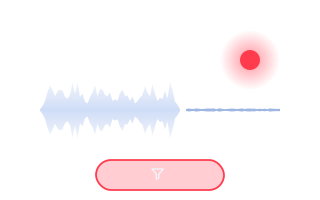
Don't subscribe on our say-so. Install the trial, run one real lesson through your normal recorder with Krisp underneath, download the file, and play it back-to-back against yesterday's take. Seven days is more than enough to know.
Marked on the slate as paid: start a Krisp plan from this button and Krisp pays the desk a commission for the referral. You pay krisp.ai’s own list price, not a cent more. It never changes the verdicts above. Prices and plan details verified 20 September 2026. The no-commission alternative, as always: OBS's built-in RNNoise filter.
The desk's verdict
For the single-recorder creator in a quiet room, Krisp is a solution to a problem you don't have — skip it with our blessing. For the working course creator with a normal noisy life and three recorders in rotation, it's the cleanest architecture available: one paid layer that upgrades every capture you'll make, uniformly, including the ones Loom would otherwise hand you dirty. Price the subscription against one avoided re-recording session per year and it tends to argue for itself. Then close the loop the free way: one-pass narration and room tone cost nothing and finish the job no software starts.